Visual connections · Picture Solitaire
How to Play Picture Solitaire: Sort Cards by Theme
Learn to recognize picture categories, sort illustrated cards and plan useful reveals in Picture Solitaire, also called Solitaire Match: Sort Puzzle on iOS.
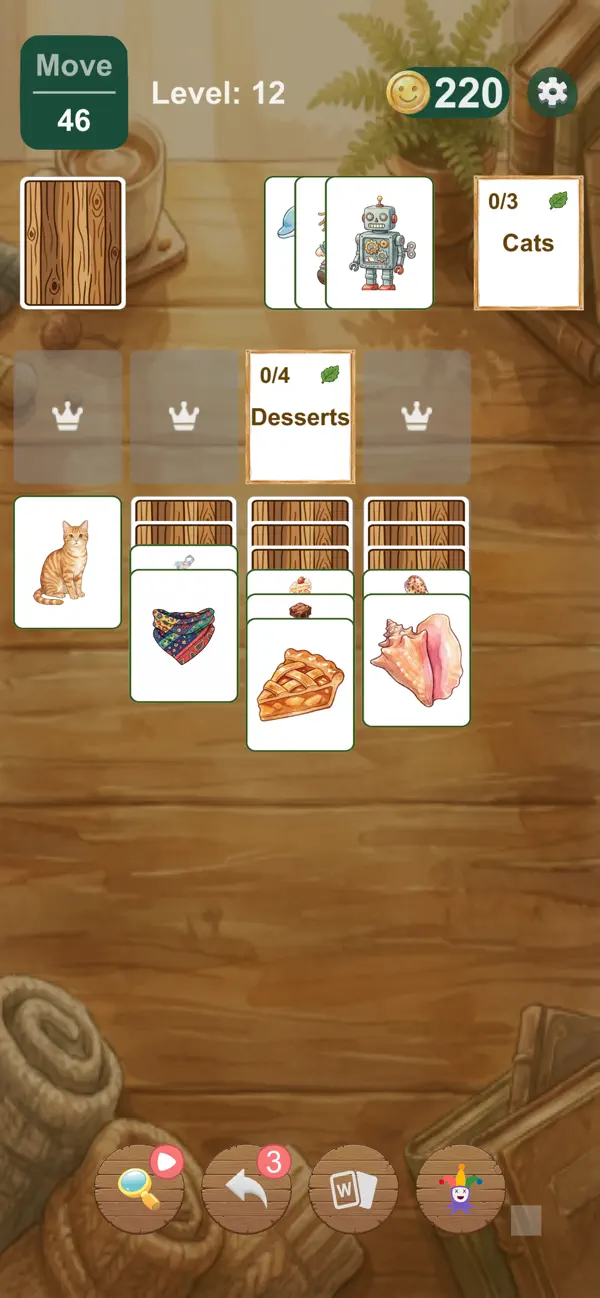
Picture solitaire replaces much of the word recognition in a category puzzle with illustrations. You look at an object, recognize its theme, and find a useful way to collect it. A cat belongs with Cats; a slice of pie belongs with Desserts.
Our game is presented as Picture Solitaire on this website. Its store names are Solitaire Match: Sort Puzzle on the App Store and Picture Solitaire Zen on Google Play. Those names lead to the iOS and Android listings linked from our product page.
Look for the object, then the theme
Start by naming what the picture shows as simply as you can. “Cat,” “pie” or “scarf” is more useful than “something blue” or “a round shape.” Then compare that object with the category labels visible on the board.
The official screenshots show categories including Cats, Desserts and Scarves. Two cards can share a color without sharing a category; two different-looking cats can still belong together. The theme is the connection, not an exact match between pixels.
Open a category and collect its pictures
Find an accessible category card and open its collection slot. Move the matching pictures into that category when the board allows it. Use card stacks to uncover illustrations and category cards underneath, then complete the groups to clear the board.
Knowing that a picture belongs with Cats does not mean you can always collect it immediately. Its card may be blocked, or the category may not yet be available. Distinguish recognition from access: the first is about the picture, while the second is about the board.
This is category solitaire, not simply a game of tapping two identical pictures. If you are new to the collection-slot idea, the word solitaire introduction explains the basic structure with written examples.
Make your next move reveal something useful
Imagine you can legally move either a cat that covers a hidden card or a dessert that exposes nothing new. If neither move finishes a category or creates another immediate benefit, moving the cat is worth considering because it gives you more information.
Now imagine the dessert is the final card required by an open group. Completing that group could free a collection slot, so the comparison changes. There is no single rule that makes every cat move or every finishing move automatically best.
Before dragging, ask what the move will accomplish. After dragging, look again. Newly revealed information is a reason to revise your plan, not to continue the same sequence automatically.
What to do with an ambiguous illustration
Do not assume every stylized picture is obvious at first glance. Read the available category labels and look for recognizable details of the object. If your identification is uncertain, avoid making a complicated plan that depends on it being correct.
The game’s Gallery lets you revisit illustrations you collect. It provides another opportunity to look at the artwork outside the pressure of a particular board. The game also offers Hint, Shuffle and Joker; check the in-game instructions before using them, since this guide does not promise unlimited help.
Our word category examples can help explain the general idea of thematic grouping. They describe the Word game’s library, however, and are not a claim that Picture Solitaire uses the exact same set of cards.
Choose the kind of puzzle you enjoy
Picture Solitaire includes a campaign and custom games with a difficulty choice. You can also choose card backs and backgrounds. Start with a board you can read comfortably and focus on recognizing the categories before trying to optimize every move.
Prefer equations to illustrations? Math Solitaire uses equal numerical results as its connection. Prefer reading category names and vocabulary? Try Word Solitaire. For the illustrated version, the Picture Solitaire page has both store links and more official screenshots.
Have a question about this guide? Get in touch.